Key Takeaways:
- RTL layout alone doesn't meet Dubai's Arabic-English accessibility standards.
- Arabic dialect voice recognition still carries notable error rates.
- Arabic-English code-switching is normal user behavior, not an edge case.
- MSA suits formal sectors, Gulf Arabic suits consumer apps.
- UAE's U.Ask assistant already sets the bilingual AI benchmark.
- Dubai's Services 360 push signals bilingual UX is now baseline, not optional.
Introduction : Why Arabic Voice UX Is More Than Just RTL Layout
Dubai’s mobile app ecosystem is becoming increasingly conversational. Users are no longer satisfied with simply tapping through menus, reading instructions, and filling out forms. They expect applications to understand natural questions, respond quickly, and adapt to the way they communicate. For businesses targeting Dubai and the wider UAE, this means Arabic support cannot stop at translating screens or switching the interface from left-to-right to right-to-left.
A genuinely bilingual application needs to understand language, context, culture, tone, and user intent. This becomes particularly important when voice assistants, AI chatbots, search, customer support, booking systems, healthcare applications, fintech platforms, and government-facing services are involved.
Dubai’s digital-service direction reinforces this expectation. Dubai’s digital-service regulations require digital services to be user-friendly, accessible, and available in Arabic, English and other languages.
The Gap Between Visual Localization and Conversational Localization
Visual localization changes what users see. Conversational localization changes how the application understands and communicates with them.
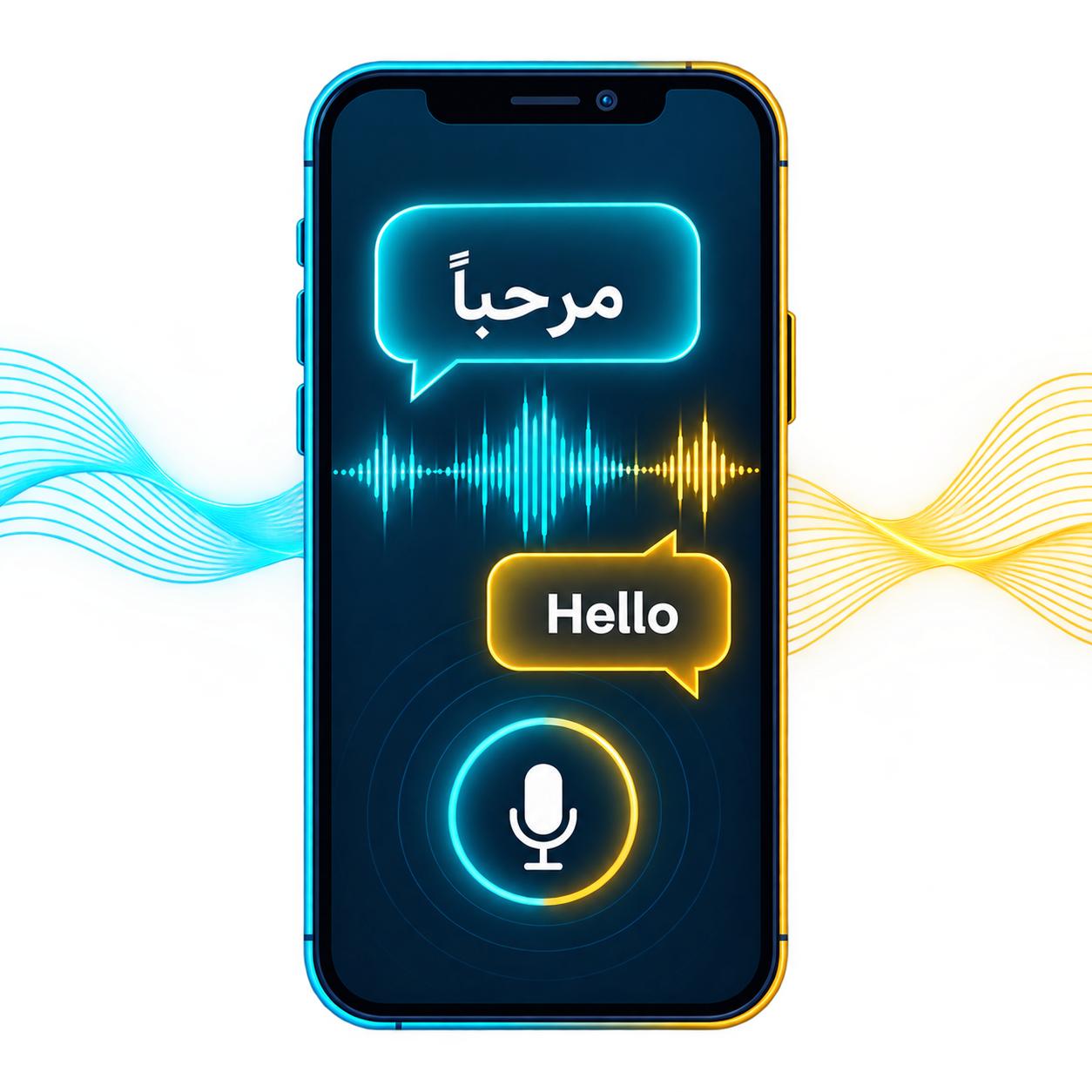
An Arabic button, translated navigation menu, or RTL-compatible checkout screen may technically make an application bilingual. However, imagine a user asking a voice assistant a question using Gulf Arabic, inserting an English product name, and expecting an immediate answer. A simple translation layer is unlikely to provide the same quality of experience.
For example: A user may speak Arabic while referring to a service, brand, location, technical term, or product using English. The application needs to understand the meaning of the complete sentence rather than processing Arabic and English as two completely separate systems.
This is where conversational UX becomes a product strategy rather than a translation exercise.
Who Needs This Guide (App Founders, Product Teams, UX Designers Building for the UAE Market)
This approach is particularly valuable for founders, product managers, UX teams, technology companies, and enterprises launching applications in Dubai.
It matters even more for industries where users frequently ask questions instead of navigating manually. Banking, healthcare, travel, hospitality, real estate, retail, transportation, government services, and customer support applications can all benefit from bilingual voice and conversational AI.
For an app entering the UAE market, the objective should not simply be “Arabic available.” The stronger objective is: Can an Arabic-speaking customer complete the same journey naturally and confidently as an English-speaking customer?
Understanding Dubai's Bilingual User Base
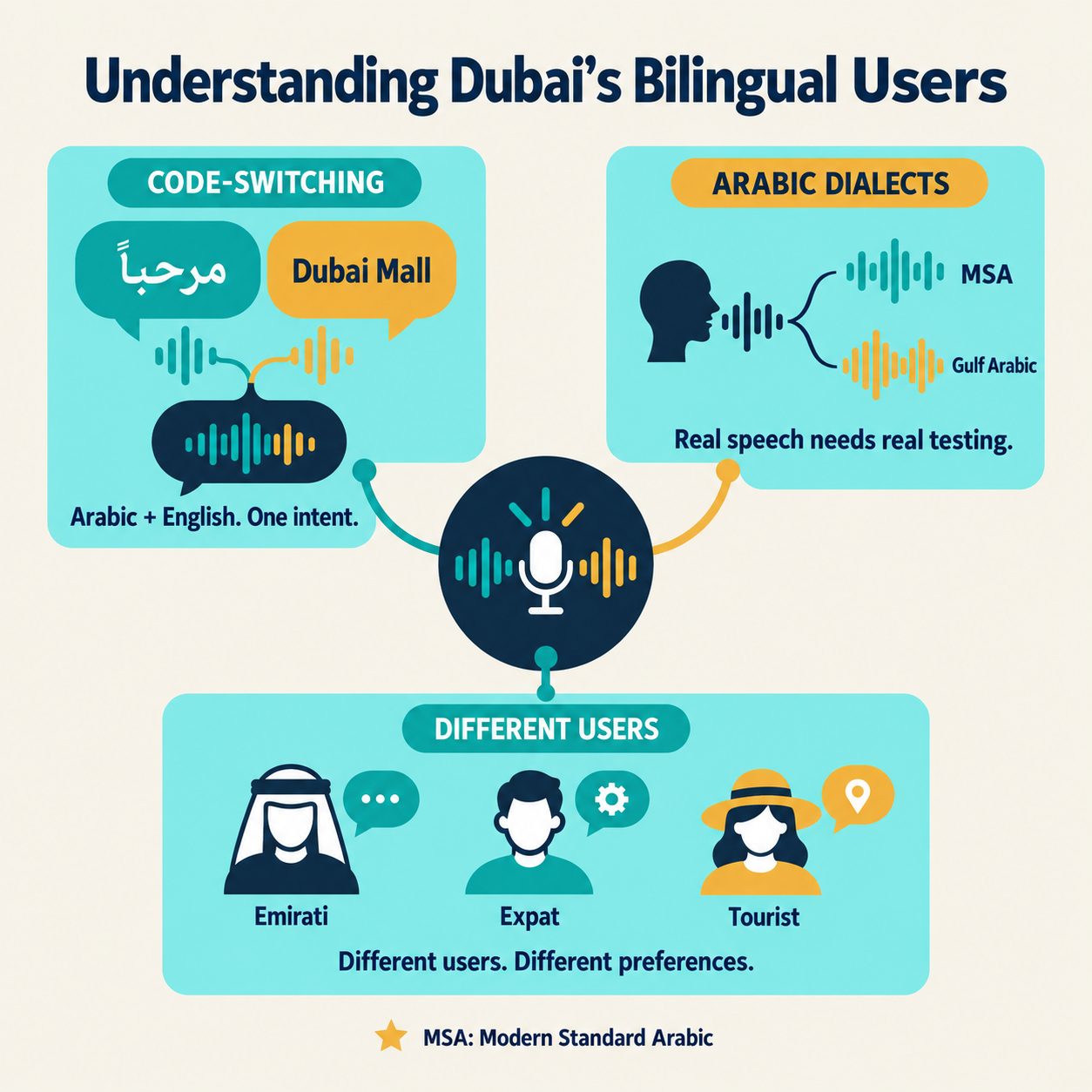
Dubai is a highly international market where Arabic and English frequently coexist within professional, commercial, and everyday digital experiences. This creates an environment where bilingual applications must accommodate different communication preferences instead of assuming that every user belongs to one linguistic category.
Arabic-English Code-Switching in Everyday UAE Conversations
Code-switching occurs when speakers move between languages during the same conversation. In Dubai, this can appear naturally when users mention technology, brands, locations, professional terminology, or digital services.
A customer might communicate primarily in Arabic while using an English brand name or technical expression. A voice assistant that expects every word to belong to one language may misinterpret the request even when the user's intention is completely clear.
The solution is not to force users to select one language before every interaction. A stronger conversational architecture detects context and maintains the user's preferred communication style wherever possible.
Dialect Differences: Gulf Arabic vs Modern Standard Arabic in Voice Interfaces
Arabic is not a single conversational experience. Modern Standard Arabic provides consistency across formal communication, while Gulf Arabic and other regional varieties are much closer to how many people naturally speak.
This distinction is particularly important for voice interfaces because speech recognition systems can perform differently when exposed to dialectal speech. Recent Arabic ASR research continues to identify dialect recognition and dialect-specific speech processing as challenging areas. One 2025 multidialectal Arabic speech-processing study reported that the best systems still produced substantial word and character error rates in dialectal speech recognition.
For a Dubai-focused application, this means Arabic voice UX should be tested against realistic speech rather than only carefully pronounced Modern Standard Arabic.
Why User Expectations Differ Across Emirati, Expat and Tourist Segments
A bilingual app serving Dubai may simultaneously address Emirati users, Arabic-speaking residents from different countries, English-speaking expatriates, and international visitors.
Their expectations can differ considerably. One user may prefer formal Arabic, another may naturally use Gulf expressions, while another may switch between Arabic and English without thinking about it.
This makes personalization important. Instead of creating one “Arabic experience” and assuming it works for everyone, product teams should identify the application's primary audiences, understand their language behavior, and build flexible interaction patterns around those needs.
Why RTL Layout Alone Doesn't Solve Arabic UX
RTL(Right To Left) is an essential foundation for Arabic applications, but it is only the visual layer of localization.
A genuinely localized product must consider language direction, content hierarchy, numbers, dates, forms, notifications, voice, chatbot behavior, search, error messages, accessibility, and the emotional tone of communication.
Common RTL Mistakes That Still Break the Experience
Common problems include incorrectly mirrored icons, poorly aligned form fields, inconsistent button placement, broken mixed-language layouts, improperly handled numbers, and English terms appearing awkwardly inside Arabic sentences.
There is also a subtler issue: developers may technically implement RTL while leaving the underlying user journey unchanged. The screen looks Arabic, but the experience still feels designed for English-first users.
For example : An Arabic checkout page may be visually correct but display an error message that sounds like a machine translation. The interface technically works, but user trust declines.
Where Visual RTL and Voice/Conversational Design Diverge
Voice interfaces do not have a physical reading direction in the same way a screen does. Their challenges are instead related to pronunciation, intent, speech recognition, response timing, language switching, and conversational context.
A user may visually interact with an RTL interface while speaking in Arabic and using English terminology. Therefore, the visual localization layer and conversational intelligence layer need to work together without being treated as the same problem.
Designing Voice Interfaces for Arabic Speakers
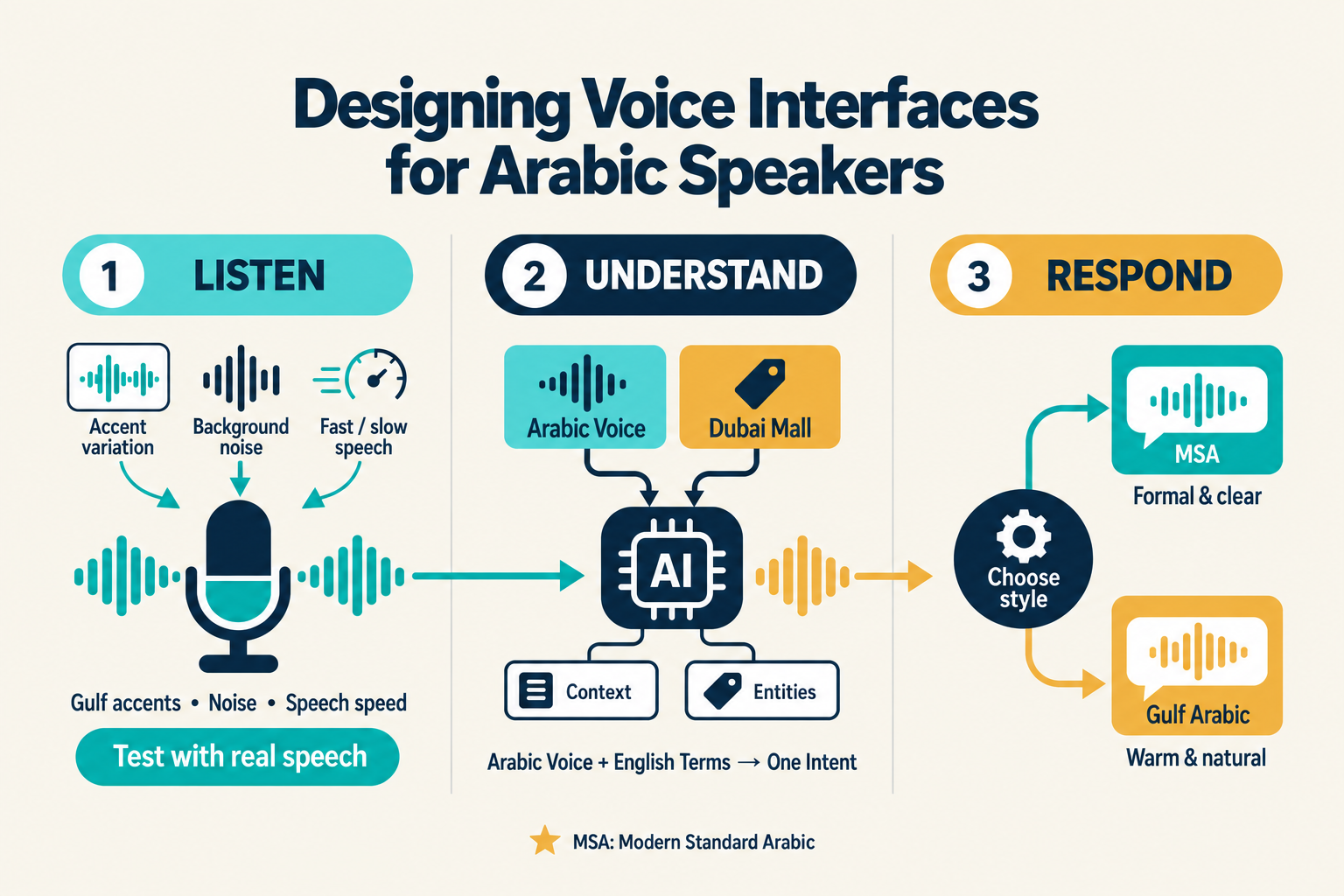
Voice interaction can remove friction from mobile experiences, particularly when users are driving, multitasking, have accessibility requirements, or simply prefer speaking to typing.
However, Arabic voice UX requires considerably more attention than connecting a microphone to an AI model.
Speech Recognition Challenges With Gulf Arabic Accents
Speech recognition systems can struggle with dialect variation, pronunciation, background noise, speech speed, and regional vocabulary.
Research into Arabic ASR shows that machine recognition remains more difficult for dialectal Arabic than for controlled standard-language scenarios. Earlier benchmarking research also found measurable gaps between machine and human Arabic speech recognition performance.
For a Dubai application, testing should therefore include realistic accents, spontaneous speech, incomplete sentences, background noise, and different speaking speeds.
Handling Code-Switched Voice Input (Arabic and English in One Sentence)
Mixed-language input should be treated as normal behavior rather than an exception.
Consider a travel application where a user speaks an Arabic sentence but mentions “Dubai Mall,” “business class,” or “booking confirmation” in English. The system should identify the intent, preserve important entities, and return a useful response instead of asking the user to repeat the request in one language.
This requires multilingual speech recognition, language-aware NLP, entity extraction, and contextual intent recognition to operate as one conversational pipeline.
Choosing Between MSA and Dialect for Voice Responses
The right choice depends on the brand and audience.
MSA can provide clarity, consistency, and a formal tone that works well for banking, government, healthcare, legal, and official communication. A more conversational Gulf-oriented approach can feel warmer and more natural for consumer-facing applications.
The best solution may not be a strict choice between the two. The application can use formal Arabic for sensitive or official information while maintaining a more approachable conversational style for everyday assistance.
Building Conversational AI and Chatbots for a Bilingual Audience
Conversational AI should feel like a natural extension of the product rather than a separate chatbot window.
Dubai businesses can use conversational AI for customer support, lead qualification, product discovery, booking, FAQs, navigation, service requests, and personalized recommendations.
Designing Conversation Flows That Feel Natural in Both Languages
A bilingual conversation flow should preserve the same business objective while adapting the wording, tone, and interaction structure for each language.
For example: An English conversation may use short direct prompts, while the Arabic version may require different sentence construction to sound natural.
The goal should not be word-for-word equivalence. The goal should be intent equivalence.
Tone and Formality: What Arabic-Speaking Users Expect From an App Assistant
Tone can strongly influence trust.
A financial application should avoid sounding excessively casual, while a travel application may benefit from a warmer personality. Healthcare assistants need clarity and empathy, whereas retail assistants can be more conversational.
Arabic responses should also avoid sounding artificially translated. Native-language review is essential because grammatical correctness alone does not guarantee conversational naturalness.
Fallback Strategies When the AI Misunderstands Dialect or Mixed Input
No conversational system understands every request perfectly.
A good fallback should avoid simply saying “I didn't understand.” Instead, it can confirm the likely intent, offer relevant choices, or ask a short clarification question.
For example: Instead of restarting the conversation after a failed recognition attempt, the assistant could ask whether the user wants to “track an order,” “change an order,” or “speak to support.”
That keeps the user moving forward.
Technical Considerations for Bilingual Voice and Chat Features
Building bilingual conversational AI requires coordination between the front-end experience, speech services, NLP layer, AI model, backend systems, analytics, and security architecture.
Choosing Speech-to-Text and Text-to-Speech Engines With Strong Arabic Support
Speech-to-text and text-to-speech providers should be evaluated based on Arabic language coverage, dialect performance, latency, pronunciation quality, scalability, API reliability, and cost.
Teams should avoid selecting an engine purely because it lists “Arabic” among its supported languages. The more meaningful question is whether it performs reliably with the actual speech patterns of the target audience.
NLP and Intent Recognition for Mixed-Language Queries
The NLP layer should identify intent regardless of whether a query is Arabic, English, or mixed.
Entity recognition becomes particularly important for names, locations, products, dates, currencies, and service names. The system should also retain conversational context so that users do not need to repeat information after every response.
Testing and QA for Bilingual Conversational Features
Bilingual QA should cover both functional accuracy and conversational quality.
|
Testing Area
|
What Teams Should Validate
|
|
Speech recognition
|
Arabic pronunciation, Gulf accents, English words inside Arabic speech and noisy environments
|
|
Intent detection
|
Whether Arabic, English and mixed queries reach the correct workflow
|
|
Response quality
|
Grammar, clarity, tone, cultural appropriateness and factual accuracy
|
|
RTL experience
|
Text direction, icons, forms, numbers and mixed-language layouts
|
|
Fallbacks
|
Clarification prompts, recovery paths and escalation to human support
|
|
Accessibility
|
Voice controls, readable text, captions and alternative interaction methods
|
Testing should involve native Arabic speakers and bilingual UAE users rather than relying entirely on translated test scripts.
UX Design Patterns Beyond RTL for Bilingual Apps
Bilingual UX needs to extend across every point where the user reads, speaks, searches, confirms, cancels, or receives feedback.
Microcopy and Error Messages in a Bilingual Context
Small messages can have a large impact on perceived product quality.
An Arabic error message that sounds overly formal or translated can make an otherwise sophisticated application feel unfinished. Microcopy should be written for the target audience rather than mechanically translated from English.
This includes validation messages, onboarding instructions, empty states, notifications, payment confirmations, chatbot prompts, and voice responses.
Language Switching: Manual Toggle vs Automatic Detection
Manual language switching provides predictability, while automatic detection reduces friction.
A strong approach can combine both. The application can use the selected language as the default while allowing conversational input to temporarily adapt when appropriate.
The user should always feel in control, particularly when switching languages affects sensitive information or transactional actions.
Accessibility Considerations for Arabic Voice Users
Voice can significantly improve accessibility, but only when it is designed as a complete interaction mode.
Users should be able to hear responses, repeat information, correct misunderstandings, and continue without depending entirely on visual navigation.
This aligns with the UAE's broader digital-service emphasis on accessibility and inclusive digital experiences. Dubai's digital-service framework specifically highlights accessibility for people of determination.
A Step-by-Step Framework for Adding Arabic Voice and Conversational AI to Your App
Step 1: Audit Your Current Localization (Visual vs Conversational)
Start by evaluating the existing application in both Arabic and English.
Review navigation, forms, microcopy, search, notifications, chatbot interactions, voice input, error handling, and transactional journeys. The objective is to identify where Arabic support is genuinely functional and where it is simply translated.
Step 2: Define Your Target Dialect and Tone
Determine who will use the product and how they naturally communicate.
A healthcare application, luxury retail app, government service, and food-delivery platform may require completely different Arabic voices and conversational personalities.
Step 3: Select the Right Voice and NLP Stack
Evaluate speech recognition, text-to-speech, NLP, LLM, translation, analytics, and backend integration together.
The strongest architecture is not necessarily the one with the largest AI model. It is the one that delivers reliable intent recognition, appropriate responses, low latency, security, and manageable operating costs.
Step 4: Design and Prototype Conversation Flows
Prototype real user journeys before investing heavily in production development.
Test scenarios such as booking, cancellation, search, support requests, product discovery, account assistance, and escalation. Include Arabic-only, English-only, and mixed-language examples.
Step 5: Test With Real Bilingual Users, Not Just Translators
This is where many bilingual products fall short.
A translation can be linguistically correct while still sounding unnatural. Real bilingual users can identify hesitation, awkward terminology, dialect problems, incorrect assumptions, and conversational friction that standard translation QA may miss.
Common Mistakes Businesses Make With Arabic Voice UX
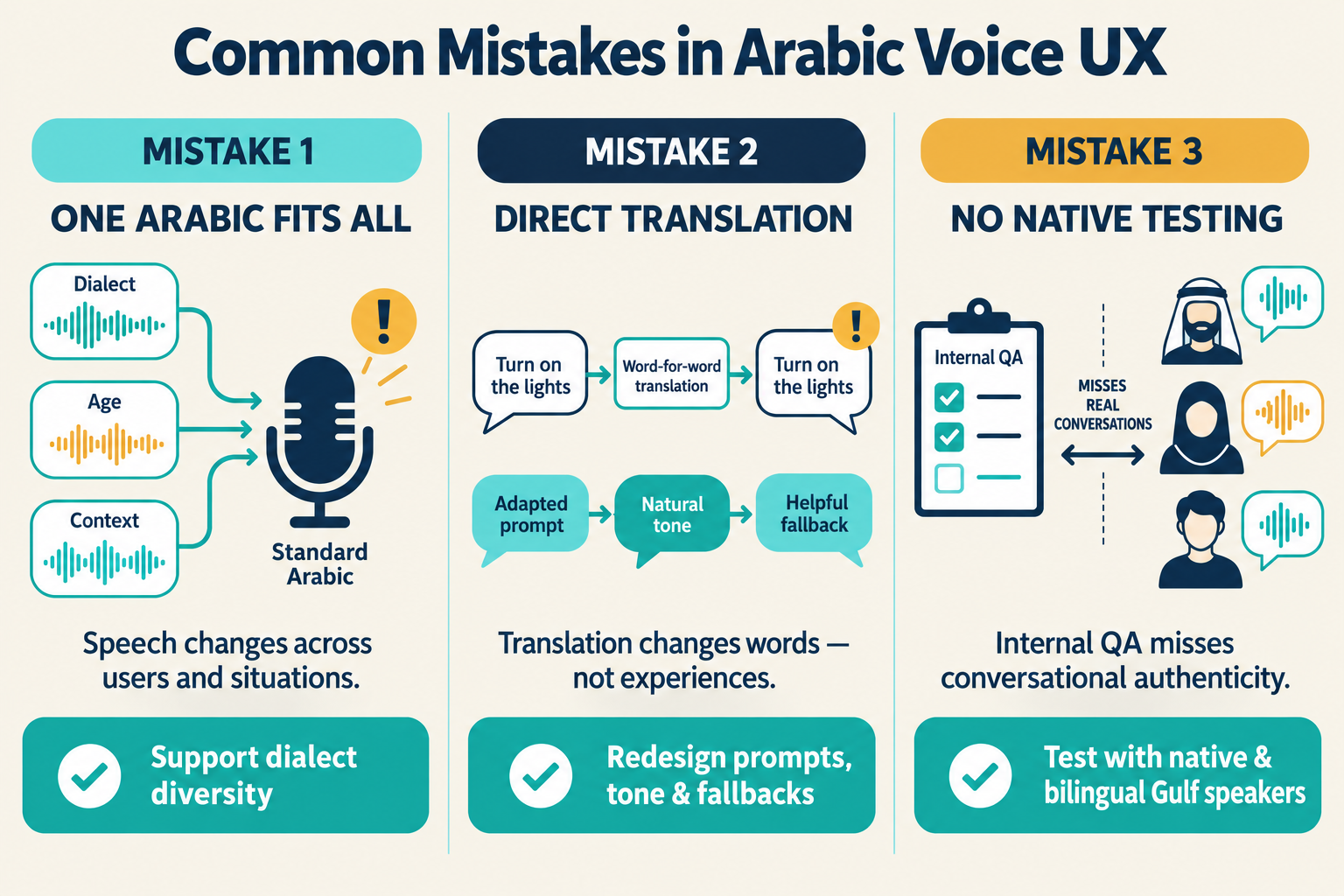
Treating Arabic as a Single Uniform Language
Arabic users are not a single linguistic group.
Dialect, region, age, professional background, and context can influence how people speak and interact with technology. Treating Arabic as one standardized voice input can therefore create unnecessary recognition and UX problems.
Relying on Direct Translation Instead of Conversational Redesign
Translation changes words. Localization changes experiences.
A successful bilingual assistant needs adapted prompts, responses, confirmation patterns, fallback messages, terminology, and personality. The English conversation should provide the functional foundation, but Arabic should be designed to sound native within that framework.
Skipping Real-User Testing With Native Gulf Arabic Speakers
Internal teams can validate functionality, but only realistic users can validate conversational authenticity.
A Dubai-focused application should include native and bilingual speakers during usability testing, particularly when voice recognition and AI responses are central to the customer journey.
How TechQware Approaches Bilingual Voice and Conversational Design
At TechQware, we view bilingual mobile development as a product-experience challenge rather than a translation task.
Our approach connects UI/UX, mobile app development, AI integration, backend engineering, localization, testing, and business requirements into one product strategy. For Dubai-focused applications, the objective is to create experiences that feel locally relevant while maintaining the scalability and technical reliability expected from a modern digital product.
Our Process for Dialect and Tone Research
We begin by identifying the application's audience, use cases, industry terminology, expected communication style, and priority language scenarios.
From there, we map conversational journeys and identify where users are likely to speak naturally, switch languages, ask follow-up questions, or require human assistance.
This enables our teams to define appropriate Arabic terminology, tone, voice behavior, fallback mechanisms, and testing scenarios before development is finalized.
A Look at How We've Approached This for Dubai-Focused Apps
For Dubai-focused products, our broader development philosophy is built around localization from the beginning rather than adding Arabic as a final development phase.
This means considering bilingual navigation, RTL behavior, Arabic-English content, voice interactions, AI-powered features, secure integrations, accessibility, and user journeys during product planning itself.
The UAE's own digital transformation provides a strong indication of where customer expectations are heading. The UAE Government's U.Ask platform, for example, is designed as an AI-powered conversational assistant and supports Arabic and English while also providing translation into more than 30 languages.
Dubai's Services 360 initiative similarly targets highly automated and integrated digital services, with ambitions including 100% proactive and automated services, 90% integrated services, and 90% service delivery without physical customer presence.
These examples demonstrate that conversational and proactive digital experiences are moving from experimentation toward mainstream service design in the UAE.
Conclusion : Building Voice Experiences That Feel Truly Bilingual
Arabic voice UX is no longer simply about adding an Arabic button, mirroring an interface, or connecting an Arabic speech API.
For Dubai businesses, the opportunity is much larger. A thoughtfully designed bilingual application can understand how users actually communicate, recognize mixed-language requests, respond in an appropriate tone, recover gracefully from misunderstandings, and make complex digital journeys significantly easier.
The strongest products will be those that treat Arabic and English as complete user experiences rather than two versions of the same interface.
Whether you are building a fitness application, healthcare platform, travel product, marketplace, enterprise solution, or AI-powered customer service application, bilingual conversational design can become a meaningful competitive advantage in the UAE.
With the right combination of UX research, Arabic localization, voice technology, NLP, AI integration, mobile development, and real-user testing, your app can move beyond simply supporting Arabic and start speaking the user's language naturally.
FAQs
Is RTL support enough for Arabic-speaking users?
No, RTL is an important visual requirement, but it does not address voice recognition, Arabic NLP, dialect variation, code-switching, conversational tone, localized microcopy, accessibility, or AI response quality. A complete Arabic experience requires both visual and conversational localization.
Should my app's voice assistant use Modern Standard Arabic or Gulf dialect?
There is no universal answer. MSA can work well for formal, official, healthcare, financial, and government-oriented communication, while a Gulf-oriented conversational style may feel more natural for consumer experiences. The right decision depends on the target audience, industry, brand personality, and use cases.
How do I handle users who mix Arabic and English in one sentence?
Design the conversational AI to recognize mixed-language input instead of forcing users to select one language for every interaction. The NLP layer should identify intent and important entities across both languages while preserving conversational context.
Which speech recognition tools handle Gulf Arabic accents best?
The answer depends on the application, audio environment, target audience, expected volume, latency requirements, and dialect coverage. Businesses should benchmark shortlisted speech-to-text engines using real Gulf Arabic recordings rather than selecting a provider based only on its published language-support list.
Do I need separate conversation flows for Arabic and English, or one unified flow?
The underlying business logic can often remain unified, but the conversational presentation should be localized. Arabic and English may require different wording, tone, prompts, confirmations, and fallback messages even when they ultimately trigger the same backend workflow.
How can TechQware help build bilingual voice features for my app?
TechQware can support the complete product journey, from UX research and bilingual interface design to mobile development, AI integration, conversational workflows, backend connectivity, testing, and deployment. If you are building a Dubai-focused application, our team can help design an Arabic-English experience that goes beyond RTL and is built around real user behavior, business objectives, and scalable technology.
Abhinav Srivastav
With years of experience in driving digital transformation, Abhinav Srivastav is the CEO & Director of TechQware Technologies, helping businesses build innovative mobile apps, AI-powered applications, and scalable digital solutions.

 TechQware