IT
Motion Design & Micro-Interactions: What Users Expect in 2026
 TechQware
June 26, 2026
 TechQware
June 26, 2026
Picture this: you're scrolling TikTok, tap a video, and it doesn't just load it bounces into view like it's excited to see you. By 2026, that's not fancy; it's table stakes. Motion design isn't optional anymore it's the heartbeat of great UX.
Why? Because our brains crave it. Humans are wired for movement; a subtle animation says "Gotcha!" faster than words ever could, building that trust where you think, "This app gets me."
How thoughtful motion and micro-interactions can improve usability, performance, and engagement and how your team can implement them effectively.
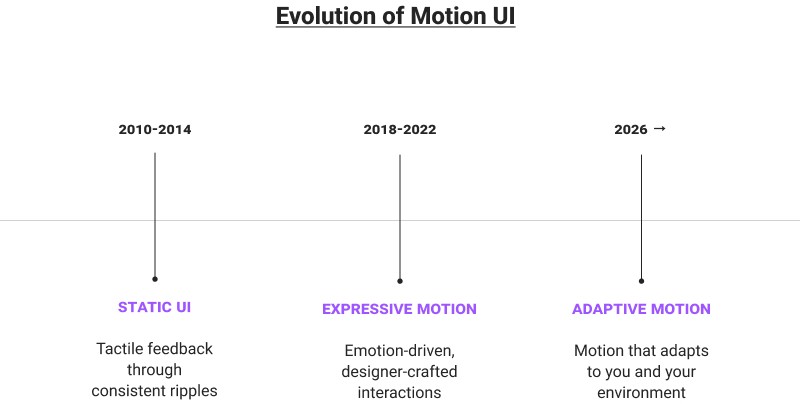
Get Expert GuidanceBack in 2014, Material Design dropped those ripple effects that made buttons feel tactile, like dropping a pebble in water. Fast-forward to Material You's 2026 glow-up: animations now tweak themselves for your wallpaper, sunlight glare, or dark mode smarter, not showier.
We've all felt Instagram's like button swell with a heart pulse or Tinder's swipe card flip away dramatically. Designers have obsessively iterated these for years, and 2026 builds on that: motions that "learn" your habits from real usage, feeling eerily intuitive.
Remember clunky 2010s apps with rigid buttons? Now everything flows menus fan out like a deck of cards, icons nudge based on your scroll speed. In 2026, it's next-level: dim battery? Animations chill out. Spotty WiFi? Loaders get empathetic.
On 120Hz phones, janky 60fps feels like watching old TV. Think iMessage bubbles that squash and rebound realistically, or drags with that perfect elastic snap powered by tools like Lottie, making apps feel alive.
Ever slide a notification away and feel it vibrate in sync? 2026 amps this: a gentle buzz as your finger "sticks" to a slider, or a thrum when you nail a swipe. It's like the phone's giving you a high-five.
No more shouting with big animations. Instead, a faint glow on long-press or icons orbiting softly to say "Hold on..." These whisper feedback, saving battery and your sanity.
How to apply motion design strategically from user flows to performance optimization with practical support from our product and UX experts.
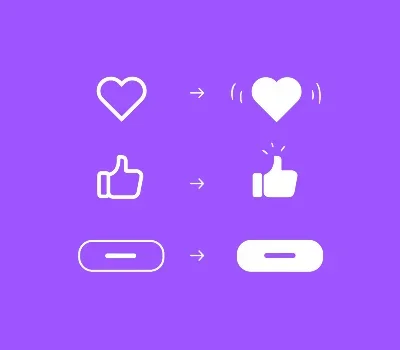
Tap a "Send" button? It ripples out with a 3D lift-off, confirming your action before your brain catches up. Users bail if it's instant and invisible feels broken.
Those pulsing skeleton screens that fill in as data arrives? Or progress bars that "breathe" in and out? They turn "ugh, waiting" into "cool, it's happening."
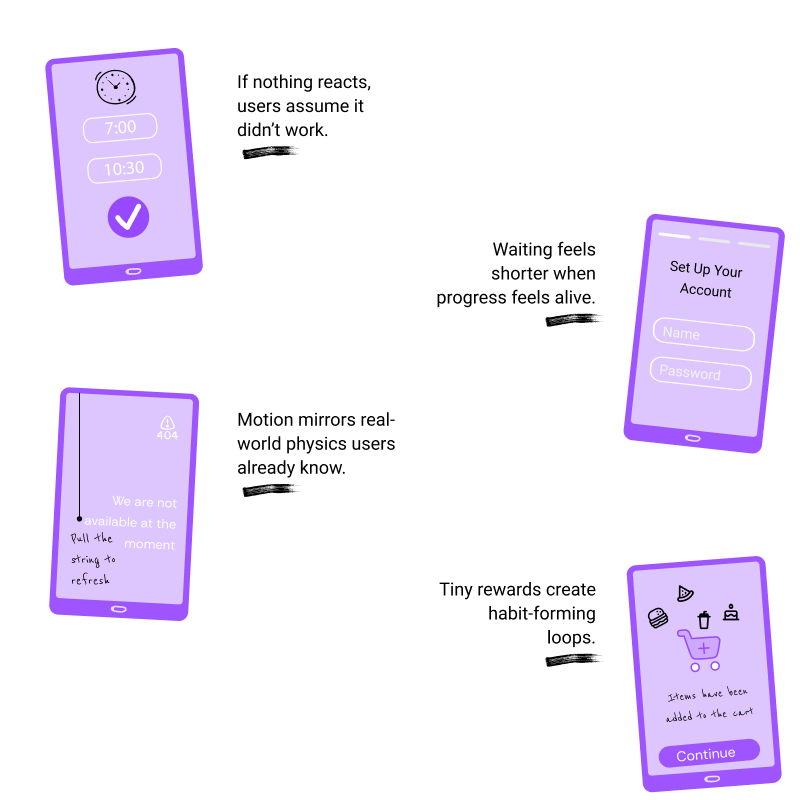
Pull down to refresh, and it stretches like taffy before snapping back with flair. Drags rubber-band at edges intuitive muscle memory from years of apps nailing this.
Cross off a todo? It scales up, sparks fly, and slots into a "done" pile. That little dopamine rush? It's why you keep coming back.
A floating thumbs-up or victory confetti turns chores into fun. I've seen apps spike retention 25% just by polishing these users stick around for the joyride.
Motion points where to look: loaders fade as content arrives, no awkward staring at blanks. Flows feel natural, like the app's reading your mind.
Tabs slide in from the direction you're swiping; breadcrumbs trail behind. Suddenly, complex apps feel simple bounce rates plummet.
In Compose, animateFloatAsState makes scaling a breeze; chain it with Modifier.spring for bouncy fun. Declarative = less bugs, more magic.
Ditch heavy images for vectors; use ValueAnimator sparingly. Profile with Android Profiler smooth on a budget phone wins users.
Lock to 120fps via DisplayManager; drop to 60Hz when idle. Test on real devices emulators lie.
Check reduceMotion settings; pause for screen readers. Motion should lift everyone up, not leave folks behind.
We help teams understand where motion adds real value and where it doesn’t so your app stays clear, accessible, and easy to use.
Start a ConversationDuolingo's streak "freeze" cracks like ice addictive. Notion pages bloom open smoothly. Apple's Fitness rings orbit to "close" with fireworks? Chef's kiss.
Metrics don't lie: apps with killer motion log 15-20% longer sessions (per Mixpanel data). It screams "premium," keeping users hooked.
By 2026, motion isn't flair it's how apps show empathy, making digital life feel human. Audit your app today: swap stale UIs for fluid ones, A/B test, and watch engagement soar. Future-proof or fade away.
At TechQware, we help teams apply motion design in a structured and practical way. This includes identifying where motion adds real UX value, designing consistent interaction patterns, ensuring animations are performance-efficient across devices, and aligning motion behavior with accessibility and platform guidelines. Our goal is to help you enhance user experience without compromising speed, usability, or maintainability.
Recognized by topdevelopers as one of the Top UI Design Companies in Noida, TechQware combines UX strategy with strong engineering practices to support brands in modernizing their applications thoughtfully and sustainably.
If you’re evaluating how motion and micro-interactions can improve your product experience, we’re here to share insights, review your current approach, and help you move forward with clarity.
Let’s chat about your goals and explore how TechQware can support your journey ahead.



app development . Sep 25, 2026
Digital Wallet Integration for Mobile A…
app development . Sep 22, 2026
Arabic Voice & Conversational AI for Mo…